Frequently Asked Questions
Everything you need to know about BUDGT and daily budget tracking.
No questions found matching your search.
About BUDGT
What is BUDGT and how does it work?
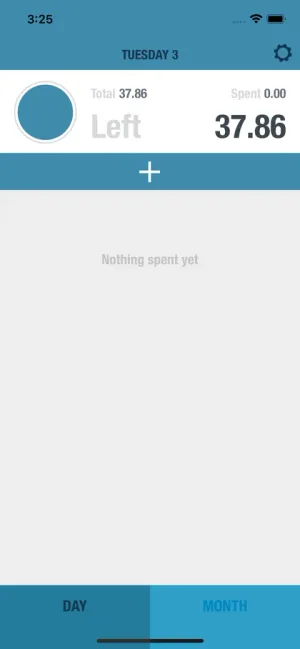
BUDGT is a simple budgeting app for iOS and Android that calculates exactly how much you can spend each day while staying within your monthly budget. You enter your monthly income and recurring expenses (rent, utilities, subscriptions), and BUDGT divides what's left across the remaining days of the month. The result is one clear number: your daily spending limit.
Who created BUDGT and why?
BUDGT was created in 2013 by Sebastian Flückiger when he was a student struggling to keep his spending aligned with a tight budget. The app was born from a personal need for simple, effective daily budget tracking—no complicated categories, no bank connections, just one number to guide daily spending decisions.
What platforms is BUDGT available on?
BUDGT is available on iOS (iPhone and iPad) and Android. You can download it from the App Store or Google Play.
How much does BUDGT cost?
BUDGT offers a free trial with full functionality. After the trial, you can choose from flexible subscription options: weekly, monthly, 3-month, 6-month, or yearly plans. Subscriptions are managed through in-app purchases on the App Store or Google Play with auto-renewal, and you can cancel anytime through your subscription settings.
The Daily Budget Method
What is the daily budget method?
The daily budget method converts your available monthly spending money into a simple daily allowance. Instead of tracking dozens of categories or reviewing every transaction, you focus on one number: how much you can spend today. If you stick to your daily budget, you're guaranteed to have money left at month's end.
What happens if I overspend one day?
If you spend more than your daily budget, the overage is automatically distributed across the remaining days of the month. Your daily budget adjusts downward slightly to compensate. Similarly, if you spend less than your daily budget, the savings carry forward and increase your allowance for the remaining days.
What do the colors in BUDGT mean?
BUDGT uses a simple color system: Blue means you're on track and safe to spend. Orange means you're cutting it close and should be careful. Red means you're projected to overspend your daily or monthly budget.
Privacy & Offline
Does BUDGT require an internet connection?
No. BUDGT works 100% offline. All your data is stored locally on your device, which means you can track expenses anywhere—including while traveling abroad without roaming or Wi-Fi.
Is my financial data safe with BUDGT?
Yes. BUDGT is private by design. Your data never leaves your device—there's no cloud sync, no servers, no account creation, and no tracking. BUDGT literally has no access to your spending data. This also means there's no risk of data breaches.
Do I need to connect my bank account?
No. BUDGT does not connect to bank accounts, credit cards, or any financial institutions. You manually log expenses, which takes seconds and actually increases spending awareness compared to automatic tracking.
Key Features
Can BUDGT automatically save money for me?
Yes. BUDGT's Savings Mode lets you set a savings goal as a percentage of your monthly budget (e.g., 10% or 20%). Your daily allowance automatically adjusts to ensure you meet your savings target. You can change your savings percentage anytime and allowances update in real-time.
What is Month Overflow and how does it work?
Month Overflow is an optional feature that carries your unspent monthly budget into the next month. If you have $50 left at month's end, that amount adds to next month's budget, increasing your daily allowance. This rewards consistent under-spending and helps build a buffer over time.
Can I budget more for weekends than weekdays?
Yes. BUDGT's Day Weights feature lets you assign different spending weights to each day of the week. For example, you can set Saturdays to have double the budget of weekdays, or give yourself extra allowance on specific days when you typically spend more.
Does BUDGT support multiple currencies for travel?
Yes. Travel Mode lets you enter expenses in a foreign currency using a custom exchange rate you set. Expenses are automatically converted and logged in your home currency. Since BUDGT works offline, you don't need roaming or Wi-Fi to track spending abroad.
Can I categorize my expenses in BUDGT?
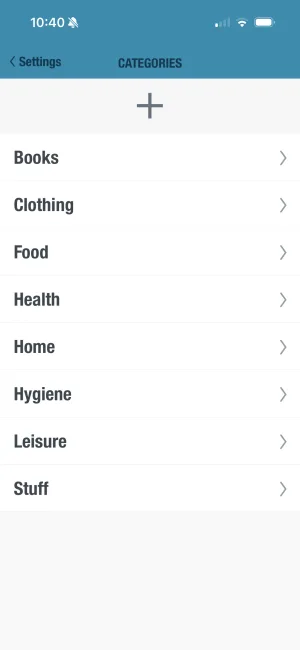
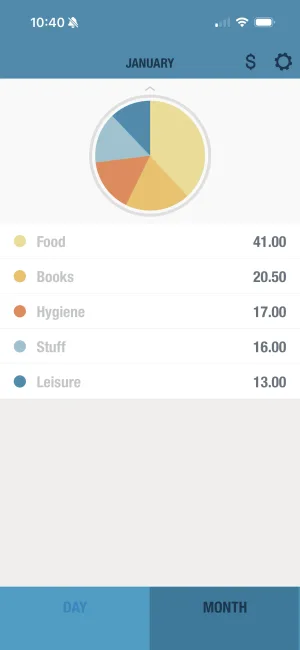
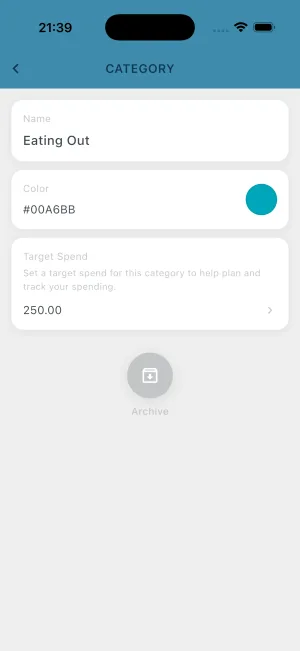
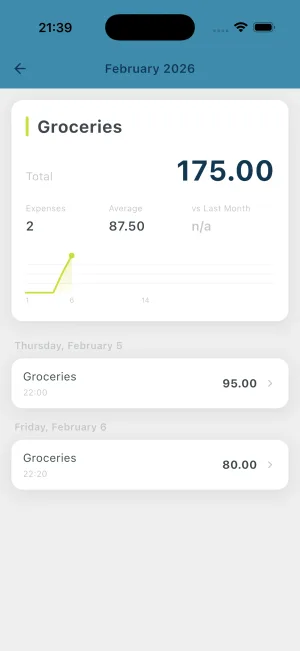
Yes. BUDGT supports unlimited flexible categories with customizable colors. When logging an expense, you select a category with one tap. You can view your spending breakdown by category in a pie chart in the Month view.
Can I export my spending data from BUDGT?
Yes. BUDGT lets you export your complete spending history as a CSV file anytime. This allows you to perform advanced analysis in spreadsheet software or keep external records. Your data is always yours.
How do I set up recurring expenses like rent and subscriptions?
In BUDGT, you add recurring expenses during setup or anytime in settings. Enter the expense name and amount once, and BUDGT automatically deducts it from your monthly budget each month. This ensures your daily budget always accounts for fixed bills like rent, utilities, subscriptions, and insurance.
Can I add expenses from previous days?
Yes. BUDGT allows retrospective entry within the current month. If you forgot to log yesterday's coffee or last week's grocery trip, simply select the date when adding the expense. Your daily budgets recalculate automatically to reflect the backdated entry.
Can I add notes to my expenses?
Yes. When logging an expense, you can add a note to remember what it was for. This is helpful for tracking business expenses, remembering gift recipients, or simply noting what that $47.50 purchase was. Notes are searchable and appear in your expense history.
What is Geotagging and how does it work?
Geotagging is an optional feature that saves your location when you log an expense. This helps you understand where you spend money—seeing which stores, neighborhoods, or cities impact your budget most. Location data stays on your device and is never shared.
Can BUDGT remind me to log my expenses?
Yes. BUDGT offers customizable daily reminders to help you build the habit of logging expenses. Choose your preferred time, and you'll get a gentle notification to record the day's spending. Consistent logging leads to more accurate budgets and better spending awareness.
Can I lock BUDGT with Face ID or a passcode?
Yes. BUDGT supports Face ID, Touch ID, and custom passcode protection. Enable app lock in settings to keep your financial data private, even on shared devices. Your budget information stays secure and accessible only to you.
Does BUDGT show projected month-end balance?
Yes. BUDGT's projection feature shows your predicted end-of-month balance based on current spending patterns. This helps you see ahead of time whether you're on track to meet your budget or need to adjust. Projections update in real-time as you log expenses.
Getting Started
How long does it take to set up BUDGT?
Most users are up and running in under two minutes. You simply enter your monthly income, add your recurring expenses (rent, bills, subscriptions), and BUDGT calculates your daily budget automatically. No account creation, no bank linking, no complicated setup.
Is BUDGT good for budgeting beginners?
Yes. BUDGT was designed with simplicity in mind, making it perfect for anyone new to budgeting. Instead of learning complex budgeting systems or managing multiple categories, you focus on one number: your daily spending limit. It's the simplest way to start building healthy financial habits.
I've tried other budgeting apps and gave up. Is BUDGT different?
Yes. Most budgeting apps fail because they're too complex—requiring bank connections, category management, and constant transaction reviews. BUDGT eliminates all of that. You get one clear number each day. If you stay under it, you succeed. That's it.
Is BUDGT Right for Me?
I'm a student on a tight budget—can BUDGT help?
BUDGT is perfect for students. When money is limited, knowing exactly how much you can spend each day prevents end-of-month panics. The app was actually created by a student facing this exact problem, and the daily budget approach works especially well for irregular student schedules and spending patterns.
I'm a freelancer with irregular income—will BUDGT work for me?
Yes. Freelancers love BUDGT because you can update your income anytime your situation changes. When a new payment comes in, simply adjust your monthly income and your daily budget recalculates instantly. This flexibility makes BUDGT ideal for variable income situations.
I want to pay off debt—can BUDGT help?
Yes. Add your debt payments as recurring monthly expenses. BUDGT then calculates your daily budget from what's left after debt obligations. This ensures you always have funds for debt repayment while seeing exactly how much discretionary spending you can afford.
I'm retired on a fixed income—will BUDGT help me?
BUDGT is ideal for fixed incomes. With a predictable monthly amount, you'll know exactly what you can spend each day without dipping into savings. The daily budget approach prevents the gradual overspending that often catches retirees off guard mid-month.
See BUDGT in Action
Want to calculate your daily budget before downloading?
Try our free Daily Budget CalculatorStill have questions?
Try BUDGT for free and see how simple budgeting can be.