The Busy Woman's Guide to Monthly Budgeting—Without the Stress

Feel like your money disappears faster than you can track it? You’re not alone. Between work deadlines, family responsibilities, meal prep, and the endless to-do list, budgeting often feels like just one more thing demanding your limited time and energy.
But here’s the truth: budgeting doesn’t have to be complicated, time-consuming, or stressful. With the right system and tools, you can take control of your finances in just 15 minutes a week—without spreadsheets, complicated apps, or financial expertise.
This guide gives you a complete, step-by-step system designed specifically for busy women who want clarity without complexity.
Why Traditional Budgeting Fails Busy Women
Before diving into the solution, let’s understand why most budgeting advice doesn’t work for women with full lives:
| Traditional Advice | Why It Fails Busy Women |
|---|---|
| Track every penny | Too time-consuming for packed schedules |
| Use complex spreadsheets | Requires consistent computer access and Excel skills |
| Review finances daily | Unrealistic with work, kids, and responsibilities |
| Detailed category breakdowns | Analysis paralysis when you’re already exhausted |
| Strict meal planning | Life happens—kids get sick, meetings run late |
The solution isn’t more discipline—it’s a simpler system that works with your life, not against it.
The 10-Step Stress-Free Budget System
Know Your Why
Write down your specific financial goal and post it somewhere visible. This motivation carries you through tough days.
Calculate Net Income
Add up all money coming in after taxes: salary, side hustles, support payments, and any other income sources.
List Fixed Expenses
Document every recurring bill: rent/mortgage, utilities, insurance, subscriptions, loan payments.
Estimate Variable Expenses
Review last 3 months to estimate groceries, gas, personal care, and other changing costs.
Assign Every Dollar
Allocate remaining money to savings, debt payoff, and discretionary spending until you hit zero.
Choose Your Method
Pick a budgeting approach that fits your personality: 50/30/20, envelope system, or zero-based.
Set Up Tracking
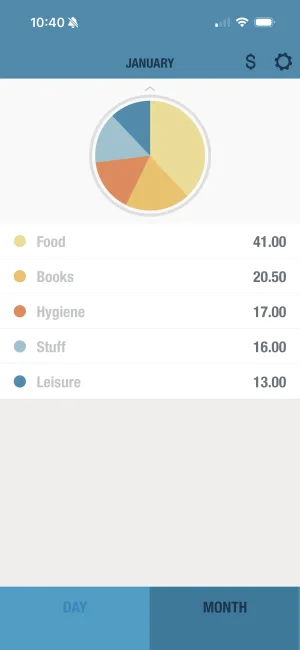
Use BUDGT or your chosen tool to log expenses as they happen—takes 10 seconds per purchase.
Schedule Weekly Check-ins
Block 15 minutes weekly to review spending and adjust as needed. Same time each week builds habit.
Build a Buffer
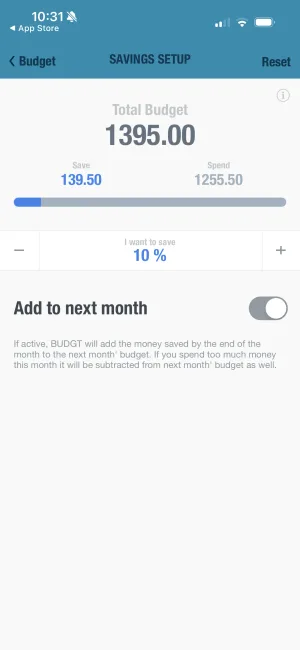
Set aside $25-100 for unexpected expenses so surprises don't derail your entire budget.
Celebrate Progress
Acknowledge wins (free activities!) to reinforce good habits and stay motivated long-term.
Step 1: Know Your “Why”
Before touching any numbers, get crystal clear on why you want to budget. Your “why” is the anchor that keeps you grounded when spending temptations arise.
Common “Whys” That Drive Success
| Goal | Emotional Driver | Timeline |
|---|---|---|
| Stop paycheck-to-paycheck living | Peace of mind, security | 3-6 months |
| Pay off credit card debt | Freedom, reduced stress | 12-24 months |
| Build emergency fund | Safety net, confidence | 6-12 months |
| Save for kids’ education | Being a good parent | 5-18 years |
| Afford a family vacation | Joy, memories, bonding | 6-12 months |
| Buy a home | Stability, investment | 2-5 years |
Write your “why” and post it somewhere you’ll see daily—your bathroom mirror, car dashboard, or phone lock screen. When the urge to overspend hits, your “why” reminds you what matters most.
Step 2: Calculate Your Monthly Income
Start with what’s coming in. Calculate your net income (after taxes and deductions):
Monthly Income Calculator
After taxes
Enter your numbers above - results update automatically
For Variable Income
If your income fluctuates (freelancers, commission-based work, gig workers):
- Look at your last 12 months of income
- Find your lowest 3 months
- Use the average of those 3 as your baseline budget
- Save extra during high-earning months
This conservative approach prevents overspending during good months and stress during lean ones.
Step 3: Track Your Fixed Expenses
Fixed expenses are bills that stay roughly the same each month:
| Category | Examples | Typical Range |
|---|---|---|
| Housing | Rent, mortgage, HOA | $1,000-2,500 |
| Utilities | Electric, gas, water, trash | $150-300 |
| Insurance | Health, car, renters/home | $200-600 |
| Transportation | Car payment, public transit | $200-600 |
| Debt Payments | Student loans, credit cards (minimum) | $100-500 |
| Subscriptions | Streaming, gym, software | $50-150 |
| Childcare | Daycare, after-school | $500-2,000 |
| Phone/Internet | Cell phone, home internet | $100-200 |
Add up all your fixed expenses. This is your non-negotiable baseline—the money that must be spent before anything else.
Step 4: Estimate Variable Expenses
Variable expenses change month to month. Review your last 3 months of spending to estimate:
| Category | Low Month | High Month | Budget Amount |
|---|---|---|---|
| Groceries | $400 | $600 | $550 |
| Gas/Transportation | $100 | $200 | $175 |
| Dining Out | $50 | $200 | $100 |
| Personal Care | $25 | $75 | $50 |
| Clothing | $0 | $150 | $50 |
| Entertainment | $25 | $100 | $50 |
| Household Items | $20 | $80 | $50 |
| Kids’ Activities | $50 | $200 | $100 |
Budget slightly above average for essentials (groceries, gas) and below average for wants (dining out, entertainment) to create natural savings.
Step 5: Create Your Complete Budget
Now put it all together:
Monthly Budget Worksheet
Enter your numbers above - results update automatically
Allocating What’s Left
Your remaining money should be divided intentionally:
| Priority | Allocation | Purpose |
|---|---|---|
| 1st | Emergency fund | Until you have $1,000+ |
| 2nd | High-interest debt | Above minimum payments |
| 3rd | Retirement savings | Future security |
| 4th | Other savings goals | Vacation, home, car |
| 5th | Discretionary spending | Fun, self-care, treats |
Step 6: Choose Your Budgeting Method
Not every system works for every person. Here’s how to choose:
Method Comparison
| Method | Best For | Time Required | Difficulty |
|---|---|---|---|
| 50/30/20 | Beginners, simple lives | 10 min/week | Easy |
| Zero-Based | Goal-oriented planners | 20 min/week | Medium |
| Envelope System | Visual learners, cash users | 15 min/week | Easy |
| Pay Yourself First | Savings-focused | 5 min/week | Very Easy |
| Daily Budget | Busy people, variable income | 2 min/day | Very Easy |
The 50/30/20 Rule
Perfect for beginners who want a simple framework:
The 50/30/20 Budget Breakdown
Zero-Based Budgeting
Every dollar gets assigned a job until income minus expenses equals zero:
| Income | $4,000 |
|---|---|
| - Housing | $1,200 |
| - Utilities | $200 |
| - Groceries | $500 |
| - Transportation | $350 |
| - Insurance | $300 |
| - Debt Payments | $400 |
| - Savings | $300 |
| - Fun Money | $200 |
| - Buffer | $50 |
| Remaining | $0 |
Daily Budget Method (Recommended for Busy Women)
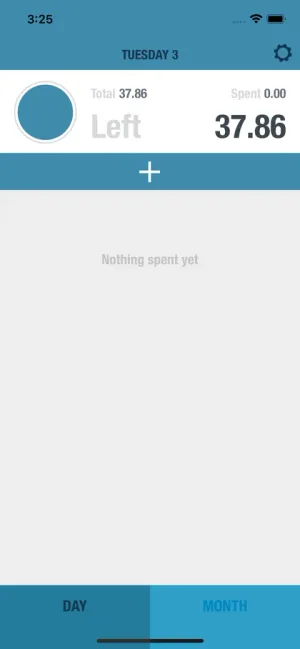
Instead of tracking complex categories, you get one simple number: how much you can spend today.
How it works:
- Subtract all fixed expenses from income
- Divide what’s left by days in the month
- That’s your daily spending limit
- Anything unspent rolls forward
Example: $4,000 income - $2,800 fixed = $1,200 ÷ 30 days = $40/day
Step 7: Set Up Your Tracking System
The best budget is one you’ll actually use. Here’s how to make tracking effortless:
Time Investment by Method
Weekly Time Required by Tracking Method
Tracking Tips for Busy Schedules
| Situation | Solution |
|---|---|
| No time to log immediately | Log all purchases during your evening routine |
| Forget what you bought | Use BUDGT’s Notes feature for quick context |
| Multiple family members spending | Each person logs their own purchases |
| Cash purchases | Keep receipts in your wallet, log weekly |
| Online shopping | Log when you click “buy,” not when it arrives |

Step 8: The 15-Minute Weekly Review
This is where the magic happens. Schedule 15 minutes at the same time each week:
Weekly Review Checklist
| Task | Time | Purpose |
|---|---|---|
| Review total spending vs. budget | 3 min | Overall status check |
| Check category balances | 3 min | Identify problem areas |
| Note any unusual expenses | 2 min | Understand one-off costs |
| Adjust next week if needed | 3 min | Stay flexible |
| Celebrate one win | 2 min | Maintain motivation |
| Plan upcoming expenses | 2 min | No surprises |
Making It a Ritual
Turn your weekly review into something you look forward to:
- Brew your favorite beverage (tea, coffee, wine)
- Put on calming music or a podcast
- Sit somewhere comfortable (not at your desk)
- Call it “Budget & Chill” or “Money Date”
- Reward yourself after (favorite show, treat, relaxation)
Step 9: Build Your Buffer Fund
Life happens. Kids get sick, cars break down, unexpected bills arrive. Without a buffer, one surprise can derail months of progress.
Buffer vs. Emergency Fund
| Buffer Fund | Emergency Fund |
|---|---|
| $25-100 | $1,000-6 months expenses |
| Built into monthly budget | Separate savings account |
| For small surprises | For major emergencies |
| Replenished monthly | Replenished as used |
| Pizza when you’re exhausted | Job loss, medical bills |
Start with the buffer. Once you consistently have $50-100 left over each month, you’re ready to build a real emergency fund.
Step 10: Celebrate Your Progress
Budgeting is hard. You deserve recognition for every step forward.
Free Ways to Celebrate Budget Wins
| Win | Celebration Ideas |
|---|---|
| First week on budget | Long bath, favorite movie |
| First month complete | Potluck dinner with friends |
| $100 saved | Picnic in the park |
| Paid off a debt | Dance party in your kitchen |
| 3 months consistent | Plan a free day trip |
| Emergency fund complete | Write yourself a congratulations letter |
Wins Worth Celebrating
- Logging expenses for 7 days straight
- Staying under budget in one category
- Saying “no” to an impulse purchase
- Having money left at month end
- Making an extra debt payment
- Building any amount of savings
Budgeting Hacks for Crazy-Busy Days
When You Have Zero Time
| Situation | Quick Fix |
|---|---|
| Exhausted after work | Just log expenses, skip the analysis |
| Kids demanding attention | Voice-to-text your purchases |
| Running late everywhere | Round up all purchases to nearest $5 |
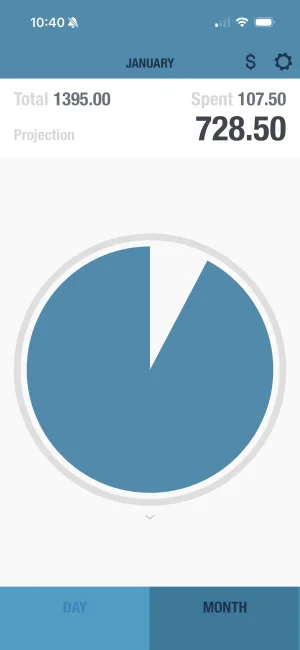
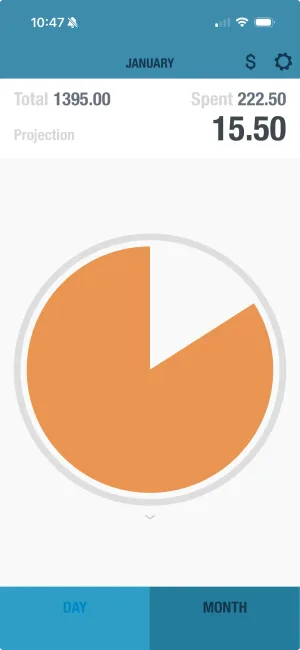
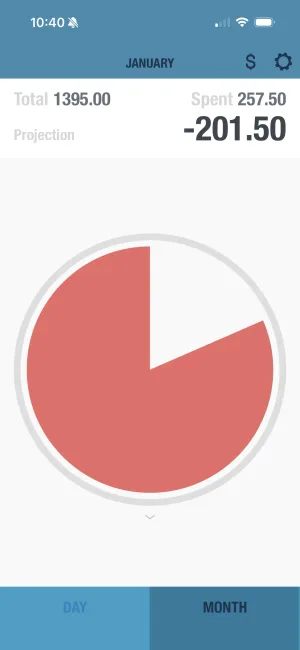
| Can’t think straight | Use BUDGT’s color system—if it’s blue, you’re fine |
| Forgot to track all week | Do a 5-minute catch-up Sunday night |
Automation Saves Sanity
| Automate This | Why It Helps |
|---|---|
| Bill payments | Never miss a payment, avoid late fees |
| Savings transfers | ”Pay yourself first” happens automatically |
| Investment contributions | Build wealth without thinking |
| Subscription cancellations | Use reminder apps to review annually |
Common Budget Busters (and How to Beat Them)
These are the spending categories where busy women most often overspend:
| Category | Why It Busts Budgets | Average Monthly Overspend |
|---|---|---|
| Dining Out | Convenience when exhausted from work/kids | $150-300 |
| Online Shopping | One-click buying, late-night browsing | $100-250 |
| Groceries | Shopping hungry, no list, impulse items | $75-150 |
| Kids’ Activities | Hard to say no, unexpected fees | $50-150 |
| Subscriptions | Forgotten services, “just $10/month” adds up | $30-75 |
Solutions for Each Budget Buster
| Problem | Solution |
|---|---|
| Dining out | Batch cook on Sundays, keep freezer meals ready |
| Online shopping | Remove saved cards, use 24-hour rule |
| Grocery overspending | Shop with a list only, try curbside pickup |
| Kids’ requests | Give them a small weekly budget to manage |
| Subscriptions | Audit quarterly, cancel unused services |
| Impulse buys | Wait 48 hours before any purchase over $25 |
Your First Month Action Plan
Week 1: Setup
- Write down your “why”
- Calculate total monthly income
- List all fixed expenses
- Download BUDGT or set up tracking
Week 2: Track & Learn
- Log every purchase (don’t judge, just observe)
- Review last month’s bank statements
- Identify your biggest spending categories
- Notice emotional spending triggers
Week 3: Create Your Budget
- Choose your budgeting method
- Assign amounts to each category
- Set up your buffer fund
- Schedule your weekly review time
Week 4: Review & Adjust
- Complete your first weekly review
- Adjust unrealistic category amounts
- Celebrate making it through month one!
- Plan any needed changes for month two
Final Thoughts
Creating a monthly budget isn’t about restriction—it’s about clarity and control. When you know where your money’s going, you can make intentional choices that support your goals and reduce stress.
The perfect budget doesn’t exist. What exists is your budget—the one that works with your life, fits your schedule, and helps you achieve your specific goals.
Start simple. Track consistently. Adjust as needed. And remember: progress over perfection.
You don’t need more hours in the day or a finance degree. You need a system designed for real life—with all its chaos, surprises, and beautiful imperfection.
You’ve got this. And on the days when it feels hard, remember your “why” and know that thousands of other busy women are right there with you, taking control of their finances one small step at a time.
Frequently Asked Questions
How much time does it actually take to use BUDGT for daily budgeting?
BUDGT is designed for busy people who don't have time for complex spreadsheets. Logging an expense takes just seconds, and you can do quick budget check-ins in under a minute. The app's simple, intuitive interface means you spend less time managing your budget and more time living your life.
Can I use BUDGT if I don't have consistent internet access?
Yes! BUDGT works 100% offline with no cloud sync required. This makes it perfect for busy women who are always on the go. You can track expenses anywhere, anytime, whether you have internet connectivity or not. Your data stays private on your device.
What budgeting methods does BUDGT support?
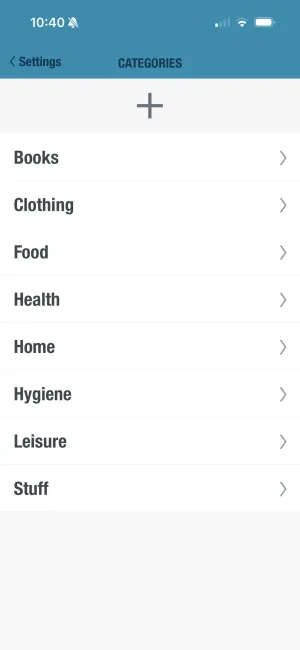
BUDGT's flexible design works with multiple budgeting approaches including the 50/30/20 rule, zero-based budgeting, and envelope-style systems. Use Categories to organize your spending however works best for you, and adjust your daily budget to align with your chosen method.
How does BUDGT help me remember to track expenses during a hectic day?
BUDGT includes customizable reminders that send gentle nudges at times you choose. The Geotagging feature automatically adds location data to expenses, helping you remember where purchases were made even if you log them later. Notes let you add quick context you'll understand later.
Is BUDGT available for Android phones?
BUDGT is currently iOS only, designed specifically for iPhone users. This focused approach allows for a streamlined, high-quality experience optimized for Apple devices.
Can I export my budget data for review or tax purposes?
Yes! BUDGT includes a CSV Export feature that lets you download your financial data. This is perfect for monthly reviews, sharing with an accountant, or keeping records for tax purposes while maintaining the app's offline privacy.
What subscription options does BUDGT offer for busy people on tight budgets?
BUDGT offers flexible subscription plans including weekly, monthly, 3-month, 6-month, and yearly options. Start with a free trial that includes full functionality, then choose the subscription length that best fits your budget. Longer subscriptions typically offer better value for committed users.
What's the best budgeting method for someone with irregular income?
For variable income, zero-based budgeting or the priority-based method works best. Budget based on your lowest expected income month, allocate every dollar to a specific purpose, and save windfalls during high-earning months. BUDGT's flexible daily budget adjusts easily when income varies.
How do I budget when I'm constantly exhausted from work and family responsibilities?
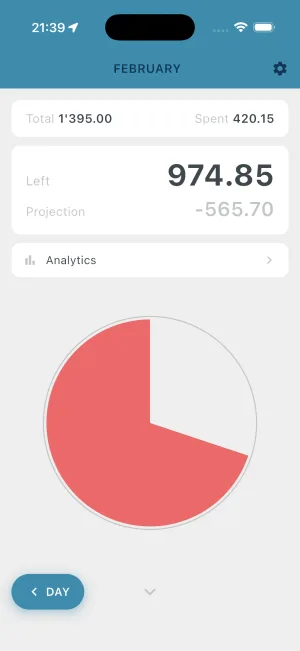
Simplicity is key. Use a 2-minute daily check (just log expenses as they happen) and a 15-minute weekly review. Automate what you can, round numbers up for easy math, and use BUDGT's visual color system (blue, yellow, orange) to know instantly if you're on track without calculating.
What if my partner and I have different spending habits?
Create individual discretionary spending allowances within the shared budget. Each person gets a set amount with no questions asked, reducing conflict over small purchases. Use BUDGT to track personal spending while maintaining privacy, then export data for joint budget reviews.
Related Articles



Ready to take control of your budget?
Download BUDGT and start tracking your daily spending today.