Why BUDGT Is the Best App for Budgeting Your Personal Finances

In today’s fast-paced world, keeping track of your personal finances can feel overwhelming. Between fluctuating expenses, unexpected bills, and trying to save for the future, staying on budget isn’t always easy. Thankfully, budgeting apps have revolutionized the way we manage money—but with dozens of options available, how do you choose the right one?
This comprehensive guide compares BUDGT to other popular budgeting apps and explains why its unique approach might be exactly what you need to finally take control of your finances.
What Makes a Great Budgeting App?
Before diving into comparisons, let’s establish what actually matters in a budgeting app:
| Quality | Why It Matters |
|---|---|
| Ease of Use | Complex apps get abandoned—simplicity drives consistency |
| Privacy & Security | Your financial data is sensitive; protection is essential |
| Effective Method | The app should help you actually save money |
| Sustainable Habits | Features should build long-term financial awareness |
| Flexibility | Works for your income type (salary, freelance, variable) |
| Affordable | Budgeting apps shouldn’t break your budget |
Many popular apps excel at one or two of these qualities but fail at others. BUDGT was designed to nail all six.
BUDGT vs. Other Budgeting Apps
Feature Comparison Table
| Feature | BUDGT | Mint | YNAB | EveryDollar |
|---|---|---|---|---|
| Bank Linking Required | No | Yes | Yes | Optional |
| Works Offline | 100% | No | No | Limited |
| Account Creation | No | Yes | Yes | Yes |
| Ads | No | Yes | No | Free tier only |
| Manual Tracking | Yes | Optional | Yes | Yes |
| Daily Budget View | Yes | No | No | No |
| Category Tracking | Yes | Yes | Yes | Yes |
| Savings Goals | Yes | Yes | Yes | Paid only |
| Travel/Multi-Currency | Yes | Limited | Yes | No |
| Data Export | Yes | Yes | Yes | Paid only |
| Privacy-First | Yes | No | Partial | Partial |
Privacy Comparison
Data Privacy by App (Higher = More Private)
How each app handles your data:
| App | Data Storage | Bank Access | Third-Party Sharing |
|---|---|---|---|
| BUDGT | Device only | Never | Never |
| Mint | Cloud servers | Full read access | Ads/partners |
| YNAB | Cloud servers | Read access | Limited |
| EveryDollar | Cloud servers | Optional | Ramsey Solutions |
Why BUDGT Stands Out
1. The Daily Budget Approach
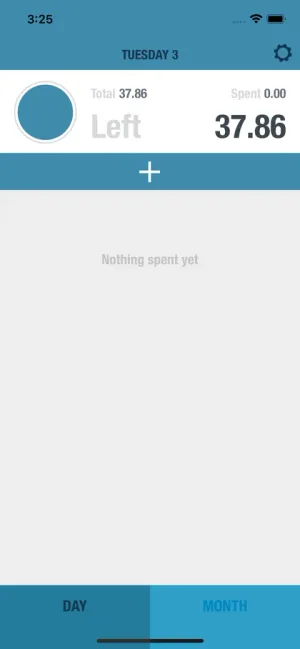
Most budgeting apps show monthly totals that feel abstract and overwhelming. BUDGT takes a different approach: one number tells you everything.
How it works:
- Enter your monthly income
- Set your recurring expenses (rent, bills, subscriptions)
- BUDGT calculates your daily spending limit
- Spend up to that amount each day
- Unused money rolls forward—overspending reduces tomorrow’s limit
This approach solves the biggest problem with traditional budgeting: the early-month splurge. When you see “$2,000 left this month,” it’s easy to justify a $200 purchase. When you see “$45 left today,” you make different choices.
2. 100% Offline Privacy
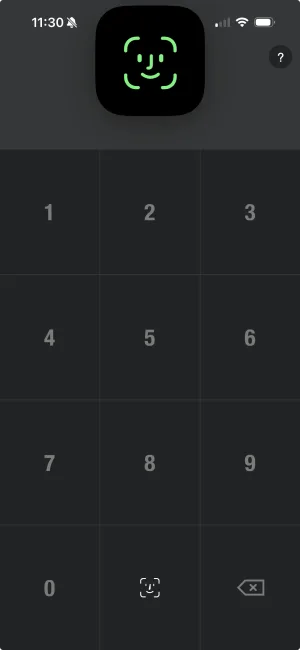
In an age of constant data breaches, BUDGT offers something rare: true privacy.
| Privacy Feature | What It Means |
|---|---|
| No cloud sync | Data never leaves your device |
| No account creation | No email, no password, no profile |
| No bank linking | Your credentials stay with your bank |
| No servers | Nothing to hack—there’s no external storage |
| No ads | Your data isn’t sold to advertisers |
| No analytics tracking | Usage patterns stay private |
Why this matters: Major financial data breaches have exposed millions of users’ information. When your budgeting data is 100% local, there’s nothing to breach.
3. Simplicity That Sticks
Complex apps get abandoned. Research shows that 80% of people who download budgeting apps stop using them within 30 days. The #1 reason? Too complicated.
BUDGT eliminates friction:
| Complex App Problem | BUDGT Solution |
|---|---|
| 30-minute setup | 2-minute setup |
| 50+ categories to manage | Simple categories you create |
| Requires internet | Works anywhere |
| Syncing errors | Nothing to sync |
| Bank connection issues | No connections needed |
| Learning curve | Intuitive from day one |
4. Manual Tracking Builds Awareness
Apps that auto-import transactions from your bank feel convenient, but research shows manual entry creates better financial habits.
Why manual tracking works:
| Factor | Auto-Import | Manual Entry |
|---|---|---|
| Awareness of purchase | Low (see it days later) | High (enter immediately) |
| Spending reflection | Passive review | Active engagement |
| Impulse prevention | None | Pause before spending |
| Habit formation | Weak | Strong |
| Long-term success | Lower | Higher |
The 10 seconds it takes to log a purchase in BUDGT creates a moment of financial mindfulness that auto-import apps can’t replicate.
BUDGT Features Deep Dive
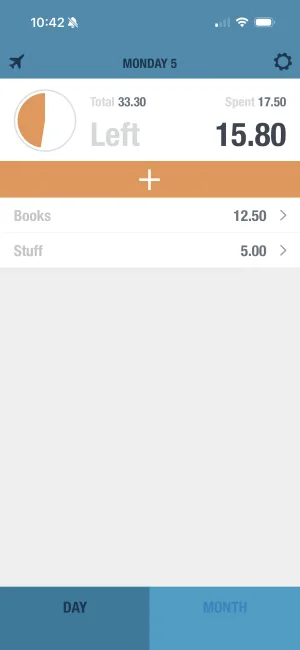
Daily Budget View
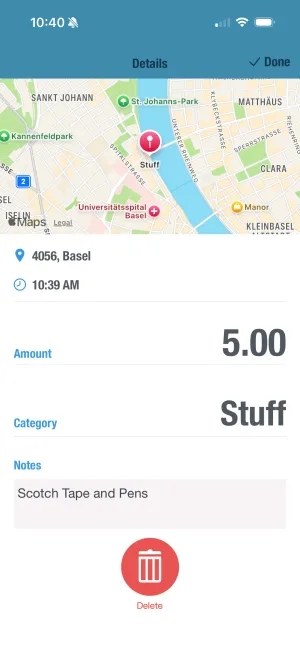
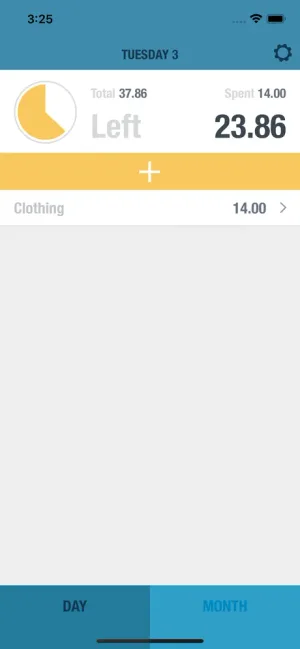
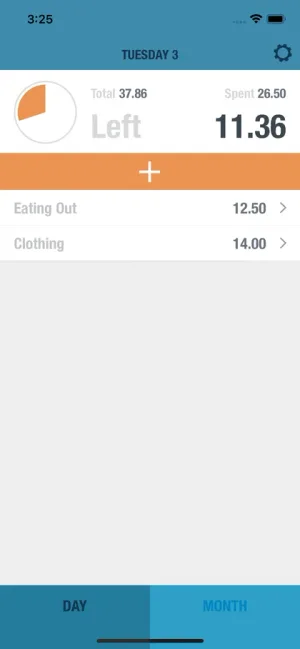
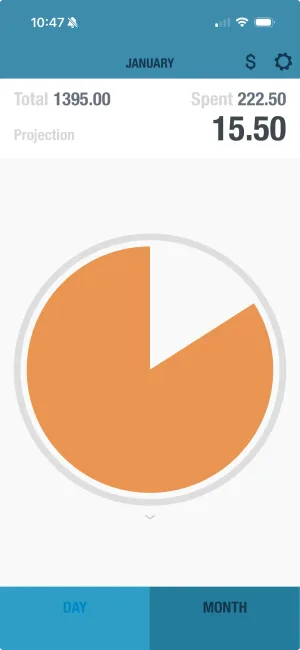
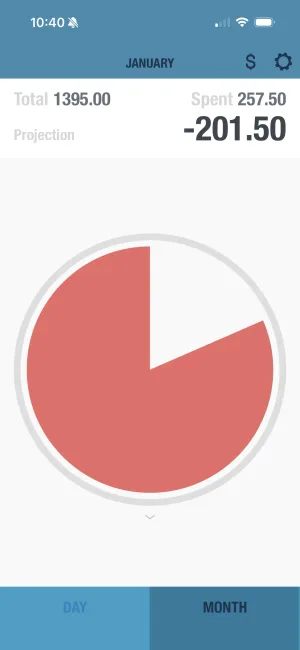
Your primary dashboard shows:
| Element | What It Shows |
|---|---|
| Daily Amount | How much you can spend today |
| Color Indicator | Blue (safe), Yellow (careful), Orange (stop) |
| Month Progress | Days remaining and overall status |
| Quick Add | One-tap expense logging |
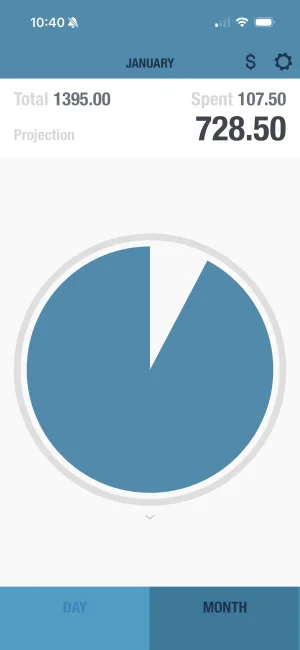
Monthly Overview
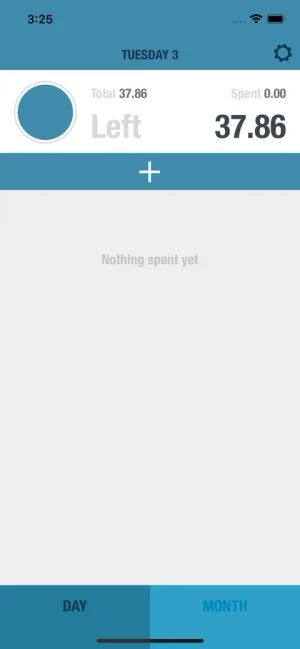
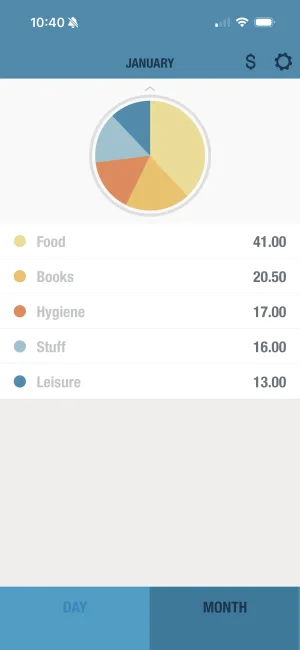
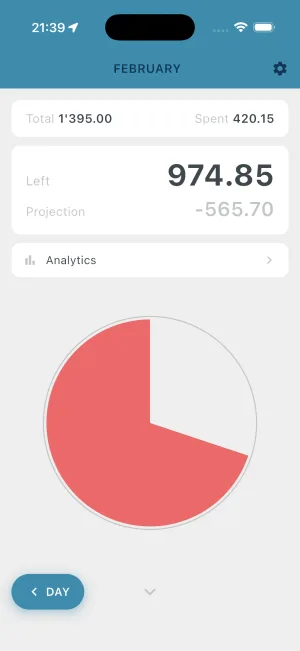
When you want the bigger picture:
| View | Information |
|---|---|
| Calendar | Daily spending by date |
| Categories | Where your money went |
| Trends | Week-over-week patterns |
| Projection | Where you’ll end up if current pace continues |
Categories & Insights
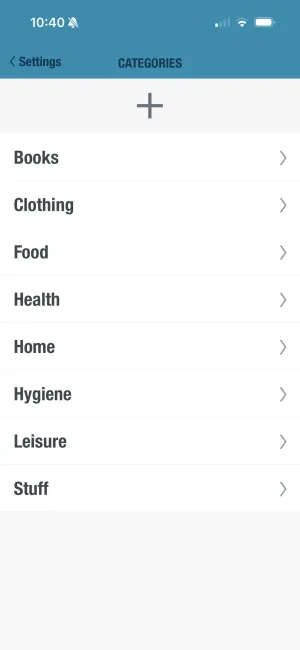
Track spending patterns without overwhelming complexity:
| Default Categories | Custom Options |
|---|---|
| Food & Dining | Create your own |
| Transportation | Rename any category |
| Shopping | Set category limits |
| Entertainment | View category history |
| Bills & Utilities | Compare month-to-month |
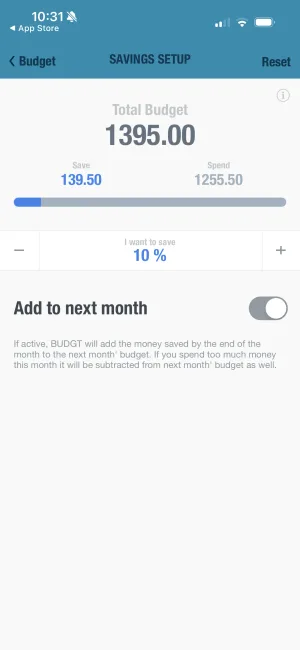
Savings Mode
Build savings into your daily budget:
| Savings Feature | How It Works |
|---|---|
| Goal Setting | Set a target amount to save |
| Daily Allocation | Savings comes off the top |
| Progress Tracking | Watch your savings grow |
| Flexible Goals | Emergency fund, vacation, anything |
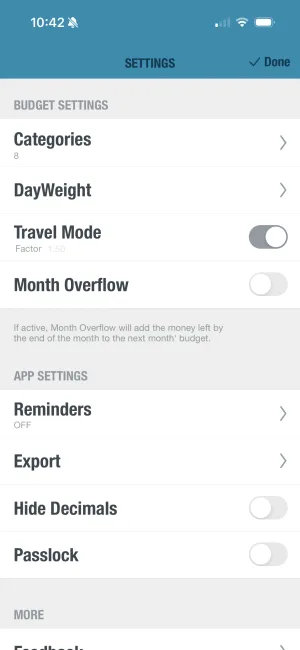
Travel Mode
Perfect for travelers and multi-currency users:
| Travel Feature | Benefit |
|---|---|
| Currency Conversion | Enter expenses in local currency |
| Real-Time Rates | Accurate conversions |
| Trip Tracking | See spending by location |
| Home Currency View | Always know actual impact |
Who Is BUDGT Perfect For?
User Type Comparison
| User Type | Why BUDGT Works |
|---|---|
| Privacy-Conscious | 100% offline, no data sharing ever |
| Busy Professionals | 10-second expense logging, glanceable status |
| Students | Simple daily limit on tight budgets |
| Freelancers | Handles irregular income naturally |
| Parents | Quick tracking between kid activities |
| Travelers | Works offline, multi-currency support |
| Minimalists | Clean design, no feature bloat |
| Habit Builders | Manual tracking creates awareness |
Lifestyle Fit Assessment
BUDGT is ideal if you:
- Value privacy and don’t want to share bank credentials
- Prefer simplicity over extensive features
- Want to build awareness through manual tracking
- Need something that works offline
- Have variable or irregular income
- Appreciate minimalist design
- Don’t want to see ads in your finances
- Want to understand where money goes, not just see it
BUDGT might not be ideal if you:
- Strongly prefer automatic transaction import
- Need detailed investment tracking
- Want bill pay integration
- Require joint account management with real-time sync
Real Users, Real Results
What Actual Users Say
“Crazy to think I am the first reviewer. I figured this app would have tons of reviews by now. It is a wonderful, minimalistic, clean take on a zero sum budget strategy. Definitely helped me get and stay on budget. Worth a try for anyone who wants to get their finances on track.”
— klaw091, “Best budgeting app I have tried so far!”
“Being a full-time mom with 2 jobs I’m obsessed with these kind of apps! I have tried a lot of budgeting apps but this one by far is the most user friendly, direct, easy on the eyes—just really perfect for me!”
— mackyboy876, “Great App!!!”
User Success Patterns
| Pattern | What Users Report |
|---|---|
| Week 1 | ”Finally understanding where money goes” |
| Month 1 | ”First month under budget in years” |
| Month 3 | ”Built real spending awareness” |
| Month 6 | ”Saved more than previous year combined” |
| Year 1 | ”Changed my relationship with money” |
How to Get Started with BUDGT
Download BUDGT
Get the app from the App Store or Google Play. No account creation needed—just download and start.
Set Your Monthly Income
Enter your take-home pay. For irregular income, use your lowest typical month as a baseline.
Add Fixed Expenses
Input recurring costs: rent, utilities, subscriptions, loan payments. These come off before calculating daily budget.
Review Your Daily Limit
See how much you can safely spend each day. This is your new guiding number.
Track As You Go
Log each expense in seconds. Watch your daily limit adjust in real-time with color feedback.
First Week Tips
| Day | Focus |
|---|---|
| Day 1 | Just track—don’t judge, just observe |
| Day 2 | Notice your spending triggers |
| Day 3 | Try staying in the blue zone |
| Day 4 | Add notes to remember purchases |
| Day 5 | Check your category breakdown |
| Day 6 | Review the week’s patterns |
| Day 7 | Celebrate any progress |
Pricing Comparison
App Cost Breakdown
| App | Free Tier | Paid Version | Annual Cost |
|---|---|---|---|
| BUDGT | Free trial | Full features | Varies by plan |
| Mint | Full (ad-supported) | N/A | Free (you’re the product) |
| YNAB | 34-day trial | Required | $99/year |
| EveryDollar | Limited | Required for most features | $79.99/year |
BUDGT Subscription Options
| Plan | Best For |
|---|---|
| Weekly | Trying it out |
| Monthly | Casual users |
| 3-Month | Building habits |
| 6-Month | Committed users |
| Yearly | Best value |
Making the Switch
If You’re Coming From Mint
| Mint Habit | BUDGT Equivalent |
|---|---|
| Auto-imported transactions | Manual entry (builds awareness) |
| Category suggestions | Create your own categories |
| Bill reminders | Use phone reminders + manual tracking |
| Net worth tracking | Focus on daily spending |
If You’re Coming From YNAB
| YNAB Concept | BUDGT Approach |
|---|---|
| Give every dollar a job | Daily budget does this automatically |
| Age of money | Focus on daily/monthly flow |
| Budgeting ahead | Savings mode for future goals |
| Multiple categories | Simplified category system |
If You’re Starting Fresh
Advantages of BUDGT as your first budgeting app:
- No bad habits to unlearn
- Simple system to master
- Privacy-first from the start
- Build awareness through manual tracking
- See results quickly with daily feedback
The Bottom Line
BUDGT isn’t trying to be everything to everyone. It’s designed for people who want:
- Privacy over convenience
- Simplicity over features
- Awareness over automation
- Sustainability over complexity
If you’ve tried budgeting apps before and struggled to stick with them, BUDGT’s approach might be the change you need. Sometimes less really is more.
Your financial journey is personal. The best app is one you’ll actually use—and BUDGT’s simplicity, privacy, and daily approach have helped thousands of users finally stick with budgeting.
Download BUDGT today and discover what stress-free budgeting feels like.
Frequently Asked Questions
What is the best app for budgeting personal finances?
The best budgeting app depends on your priorities. If you value privacy, simplicity, and offline access, BUDGT is the top choice. It requires no bank linking, works completely offline, and uses a daily budget approach that makes tracking effortless. For users who want automatic transaction imports, apps like Mint may suit better—but they require sharing your bank credentials.
Do I need to link my bank account to use BUDGT?
No. BUDGT works entirely offline and never requires bank account connections. This is a deliberate design choice for maximum privacy. Your financial data stays on your device only—never uploaded to servers, never shared with third parties. For users concerned about data breaches and privacy, this is a significant advantage.
How does BUDGT help me manage and save money?
BUDGT uses a daily budget approach that shows you exactly how much you can spend today. By manually entering each expense, you build awareness of your spending patterns. The app calculates your daily limit based on income minus fixed expenses, then adjusts throughout the month. This simple system helps users save an average of 15-20% more than complex category-based budgeting.
Is BUDGT suitable for families, students, and freelancers?
Yes, BUDGT adapts to any income situation. Students benefit from the simple daily limit on tight budgets. Families appreciate the category tracking for household expenses. Freelancers love the flexibility—irregular income works perfectly with the daily budget approach. The app doesn't assume a fixed paycheck schedule.
How does BUDGT compare to other budgeting apps like Mint, YNAB, or EveryDollar?
BUDGT differs fundamentally from Mint (bank-linked, ad-supported), YNAB (subscription-based, complex), and EveryDollar (freemium with limitations). BUDGT is 100% offline, requires no account creation, has no ads, and focuses on simplicity over features. While other apps offer more automation, BUDGT users report better long-term habit formation due to manual tracking.
Does BUDGT work offline?
Yes, BUDGT is 100% offline—always. There's no cloud sync, no account creation, no internet requirement. You can track expenses on an airplane, in a subway, or anywhere without cell service. Your data exists only on your device, which also eliminates any risk of server-based data breaches.
How much does BUDGT cost compared to other budgeting apps?
BUDGT offers a free trial with full functionality, then flexible subscription options (weekly, monthly, 3-month, 6-month, yearly). This is more affordable than YNAB ($99/year) and comparable to EveryDollar Plus. Unlike Mint (free but ad-supported), BUDGT has no ads and doesn't monetize your data. The yearly subscription offers the best value.
Can I export my BUDGT data for tax purposes or analysis?
Yes, BUDGT includes CSV export functionality. Download your complete expense history for spreadsheet analysis, tax preparation, or sharing with a financial advisor. This feature maintains privacy—you control when and what data leaves your device, unlike apps that store everything on external servers.
What makes BUDGT's daily budget approach better than monthly budgeting?
Monthly budgets fail because a single overspend early in the month creates stress for weeks. BUDGT's daily approach resets each day—yesterday's overspend just means today's limit is slightly lower. This psychological benefit keeps users motivated. Research shows daily feedback loops create stronger habits than monthly reviews.
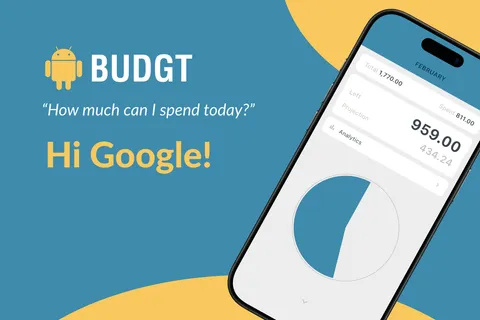
Is BUDGT available on Android?
Yes! BUDGT is available on both iOS (iPhone and iPad) and Android. You can download it from the App Store or Google Play. Both versions offer the same simple, privacy-first daily budget tracking experience.
Related Articles

Ready to take control of your budget?
Download BUDGT and start tracking your daily spending today.