Working with Lakhs and Crores: Why Hide Decimals Makes Budgeting in Rupees Easier

This post is crafted for our wonderful users in India—though the wisdom here applies no matter where you call home.
Here’s something the rest of the world finds fascinating about India: we count money differently.
While Americans talk about “millions” and “billions,” we count in lakhs (1,00,000) and crores (1,00,00,000). Our number system places commas after the first three digits, then every two digits.
This makes perfect sense to us. But it also means that when we use international apps for budgeting, the numbers often feel… off.
And then there’s the paisa problem.
The Decimal Dilemma
Most budgeting apps show amounts like this:
- ₹45,678.00
- ₹1,23,456.78
- ₹89,012.34
Those trailing zeros and paisa are everywhere. And for most practical budgeting purposes, they’re utterly useless.
Think about it:
- When you check your daily budget, do you care about 34 paisa?
- When you log an expense, do you enter ₹250.50 or just ₹250?
For 99% of budgeting tasks, rounding to whole rupees is not just acceptable—it’s preferable.
Why This Matters for Indian Users
1. We Deal with Large Numbers
With gold at ₹65,000 per 10 grams, phones at ₹80,000, and monthly rents at ₹25,000+, Indian budgets involve large numbers. Adding “.00” to everything is noise.
2. Paisa Are Practically Obsolete
When was the last time you paid in paisa? The 50-paisa coin was demonetized in 2011.
3. Mental Math Gets Faster
Quick: what’s ₹45,678.50 plus ₹23,456.78?
Now try: what’s ₹45,679 plus ₹23,457?
The second calculation is instant.
Setting Up BUDGT for Indian Users
- Set Currency to Indian Rupees (₹): Settings → Currency → Select “Indian Rupee (₹)”
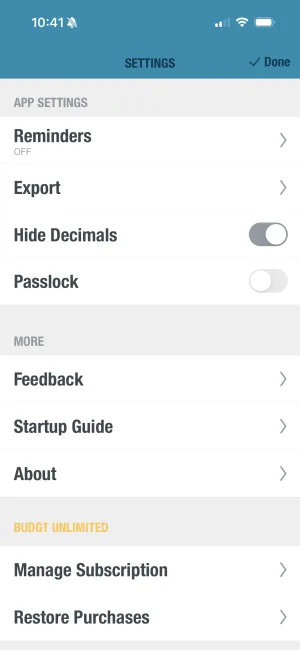
- Enable Hide Decimals: Settings → Display → Toggle “Hide Decimals” ON
- Enter Your Monthly Income: Clean numbers like ₹50,000
- Set Up Recurring Expenses: Rent: ₹18,000, EMIs: ₹12,000
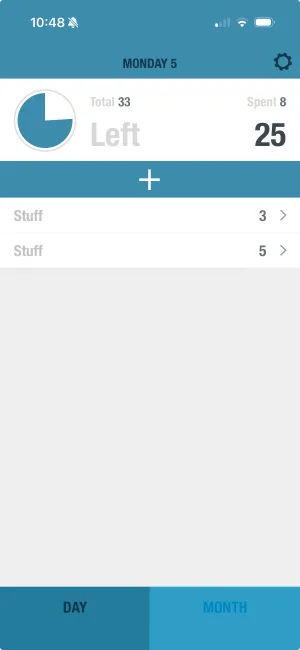
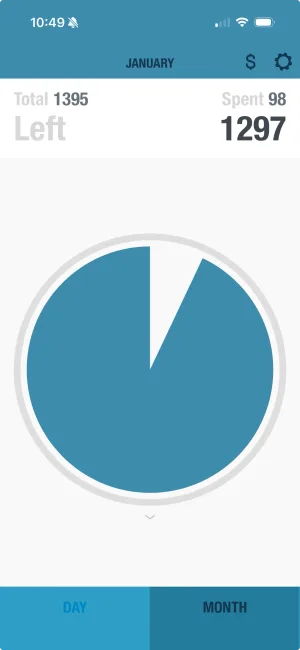
BUDGT calculates your daily spending limit from what’s left.
Works Offline—Perfect for India
BUDGT works 100% offline. No internet? No problem. Whether you’re:
- In a metro with patchy connectivity
- Traveling to tier-2/3 cities with limited data
- On a flight or train without WiFi
Your budget is always accessible.
No Bank Connection = Complete Privacy
Many budget apps in India require linking bank accounts. For users who prefer privacy:
- BUDGT never asks for bank details
- No OTP verifications
- No SMS reading permissions
- Your financial data stays on your device
Try It Yourself
If you’re managing a household budget in the lakhs, juggling multiple EMIs, or simply want cleaner financial tracking, the hide decimals feature might be exactly what you need.
Download BUDGT, set your currency to Rupees, toggle on hide decimals, and see the difference for yourself.
Budgeting in India just got a lot cleaner.
Frequently Asked Questions
How do I set up BUDGT for Indian Rupees?
Open BUDGT, go to Settings → Currency → select 'Indian Rupee (₹)'. Then toggle on 'Hide Decimals' in Settings → Display for cleaner number display.
What does hide decimals do in BUDGT?
Hide decimals removes the '.00' from all displayed amounts, showing ₹1,234 instead of ₹1,234.00. This makes numbers cleaner and easier to read at a glance.
Can I track expenses in lakhs?
Yes! BUDGT handles large numbers smoothly. Whether your monthly income is ₹50,000 or ₹5,00,000, the app displays amounts correctly using the Indian number format.
Does BUDGT work offline in India?
BUDGT works 100% offline. You can log expenses, check your daily limit, and review your spending without any internet connection—particularly useful in areas with patchy connectivity.
Why doesn't BUDGT connect to Indian banks?
BUDGT is designed for privacy-conscious users who prefer manual control over their financial data. By not requiring bank connections, the app ensures your sensitive information stays on your device only.
Related Articles



Ready to take control of your budget?
Download BUDGT and start tracking your daily spending today.